asp.net에서 댓글기능 구현 중 이해불가능한 문제가 생겼다.
public async Task<IActionResult> Details(int id, [Bind("Id,Author,Date,Password,Contents,PostId")] CommentModel commentModel)
{

    commentModel.Date = DateTime.Now;
    commentModel.PostId = id;

    _context.Add(commentModel);

    var apodModel = await _context.APODModel.Include(p => p.Comments).FirstOrDefaultAsync(m => m.Id == id);
    apodModel.Comments.Add(commentModel);

    await _context.SaveChangesAsync();

    return RedirectToAction(nameof(Details), new { id = commentModel.PostId });
}
분명 이 코드에는 Id값을 명시적으로 삽입하거나 수정하려는 시도는 없다. 그런데 댓글을 쓸 때마다..

Id값을 삽입하려고 해서 오류가 난다고 한다.. 이게 무슨..
참고로 sql은 다음과 같다.
CREATE TABLE [dbo].[CommentModel] (
    [Id]          INT            IDENTITY (1, 1) NOT NULL,
    [Author]      NVARCHAR (MAX) NULL,
    [Password]    NVARCHAR (MAX) NULL,
    [Contents]    NVARCHAR (MAX) NULL,
    [Date]        DATETIME2 (7)  NOT NULL,
    [PostId]      INT            NOT NULL,
    [APODModelId] INT            NULL,
    CONSTRAINT [PK_CommentModel] PRIMARY KEY CLUSTERED ([Id] ASC),
    CONSTRAINT [FK_CommentModel_APODModel_APODModelId] FOREIGN KEY ([APODModelId]) REFERENCES [dbo].[APODModel] ([Id])
);


GO
CREATE NONCLUSTERED INDEX [IX_CommentModel_APODModelId]
    ON [dbo].[CommentModel]([APODModelId] ASC);
보이는바와 같이 Id를 Primary Key로 지정하고 1부터 시작해서 1씩 증가하도록 설정해놨다.
일단 혹시 몰라 Bind에 Id 요소를 지우고 다시 실행했지만
public async Task<IActionResult> Details(int id, [Bind("Author,Date,Password,Contents,PostId")] CommentModel commentModel)
{

    commentModel.Date = DateTime.Now;
    commentModel.PostId = id;

    _context.Add(commentModel);

    var apodModel = await _context.APODModel.Include(p => p.Comments).FirstOrDefaultAsync(m => m.Id == id);
    apodModel.Comments.Add(commentModel);

    await _context.SaveChangesAsync();

    return RedirectToAction(nameof(Details), new { id = commentModel.PostId });
}

이번에는 입력한 내용이 저장되지 않는다. (첫번째 댓글은 sql 내에서 자체적으로 넣은 값이다.)
이거는 도대체 왜그러는지 도저히 모르겠다.
@model (APOD.Models.APODModel, APOD.Models.CommentModel)

@{
    ViewData["Title"] = "Details";
}

<h1>Details</h1>

<div>
    <h4>APOD</h4>
    <hr />
    <dl class="row">
        <dt class = "col-sm-2">
            @Html.DisplayNameFor(model => model.Item1.Title)
        </dt>
        <dd class = "col-sm-10">
            @Html.DisplayFor(model => model.Item1.Title)
        </dd>
        <dt class = "col-sm-2">
            @Html.DisplayNameFor(model => model.Item1.Date)
        </dt>
        <dd class = "col-sm-10">
            @Html.DisplayFor(model => model.Item1.Date)
        </dd>
        <dt class = "col-sm-2">
            @Html.DisplayNameFor(model => model.Item1.Explanation)
        </dt>
        <dd class = "col-sm-10">
            @Html.DisplayFor(model => model.Item1.Explanation)
        </dd>
        <dt class = "col-sm-2">
            @Html.DisplayNameFor(model => model.Item1.Hdurl)
        </dt>
        <dd class = "col-sm-10">
            <img src="@Html.DisplayFor(model => model.Item1.Hdurl)"
                 style="max-width: 400px; height: auto;" alt="image" />
        </dd>
    </dl>
</div>

<ul>
    @if(Model.Item1.Comments != null)
    {
        foreach(var comment in Model.Item1.Comments)
        {
            <li>@comment.Author</li>
            <li>@comment.Date</li>
            <li>@comment.Contents</li>
            <a asp-action="Edit" asp-route-id="@comment.Id">Edit</a>
            <a asp-action="Delete" asp-route-id="@comment.Id">Delete</a>
        }
    }
</ul>

<form asp-action="Details" asp-route-id="@Model.Item1.Id">
    <div asp-validation-summary="ModelOnly" class="text-danger"></div>
    <div class="form-group">
        <label asp-for="Item2.Author" class="control-label"></label>
        <input asp-for="Item2.Author" class="form-control" />
        <span asp-validation-for="Item2.Author" class="text-danger"></span>
    </div>
    <div class="form-group">
        <label asp-for="Item2.Password" class="control-label"></label>
        <input asp-for="Item2.Password" class="form-control" />
        <span asp-validation-for="Item2.Password" class="text-danger"></span>
    </div>
    <div class="form-group">
        <label asp-for="Item2.Contents" class="control-label"></label>
        <input asp-for="Item2.Contents" class="form-control" />
        <span asp-validation-for="Item2.Contents" class="text-danger"></span>
    </div>
    <div class="form-group">
        <input type="submit" value="댓글달기" class="btn btn-primary" />
    </div>
</form>

<div>
    <a asp-action="Edit" asp-route-id="@Model.Item1.Id">Edit</a> |
    <a asp-action="Index">Back to List</a>
</div>
Html 코드를 보면 Item2, 즉 CommentModel의 Author, Password, Contents로 입력한 데이터가 정상적으로 바운드되어야하는데 말이다.
컨트롤러 코드에서 ModelState.Isvalid인지, 쉽게 말해서 입력한 정보가 제대로 전달이 됐는지 확인하는 함수를 써서 정상적으로 전달됐으면 댓글을 입력한 Details페이지로 리다이렉트하고 그렇지 못했으면 Index페이지로 리다이렉트하는 코드를 작성해 실험을 한 결과
[HttpPost]
public async Task<IActionResult> Details(int id, [Bind("Author,Date,Password,Contents,PostId")] CommentModel commentModel)
{
    if(ModelState.IsValid)
    {
        commentModel.Date = DateTime.Now;
        commentModel.PostId = id;

        _context.Add(commentModel);

        var apodModel = await _context.APODModel.Include(p => p.Comments).FirstOrDefaultAsync(m => m.Id == id);
        apodModel.Comments.Add(commentModel);

        await _context.SaveChangesAsync();

        return RedirectToAction(nameof(Details), new { id = commentModel.PostId });
    }
    return RedirectToAction(nameof(Index));
}
댓글을 입력하면 Index페이지로 이동하는 것으로 보아 데이터의 전달이 제대로 이루어지지 않는것 같다.
근데 그 이유를 도저히 모르겠다.
드디어 이유를 알아냈다.
@model (APOD.Models.APODModel, APOD.Models.CommentModel) 문법은 Razor 뷰에서 두 개의 모델을 함께 사용할 때 사용된다. 이 문법은 뷰에서 사용할 모델을 지정하기 위한 것이며, 컨트롤러와 뷰 간에 모델을 전달하는 역할을 수행하지 않고 컨트롤러에서 바인딩할 모델에 대한 정보를 제공하지 않는다. 즉 뷰에서 컨트롤러로 바인딩할 모델을 명확하게 지정하지 않았기 때문에, 데이터의 전달이 제대로 이루어지지 않는 것이다.
따라서, 컨트롤러에서 Bind를 이용하여 뷰에서 값을 전달받으려면, 단일 모델에 대한 @model 지시문을 사용해야한다. 컨트롤러에서 뷰로 전달할 모델이 둘 이상인 경우, 이 모델들을 담는 새로운 모델 클래스를 만들고, 이를 뷰에 전달하면 된다. 이 방법으로 뷰에서는 단일 모델만 사용하고, 컨트롤러에서는 복수의 모델을 사용할 수 있다.
댓글 기능의 경우 제목, 본문, 날짜.. 등등 해당 게시글의 자세한 정보와 게시글의 댓글 폼이 필요하기에 APODModel과 CommentModel 두개의 모델을 뷰에 전달한 필요가 있다.
그러므로 다음과 같이 프로그래밍하면 된다.
먼저 컨트롤러에 APODModel과 CommentModel을 모두 담을 수 있는 임시모델을 생성한다.
public class APODAndCommentViewModel
{
    public APODModel APOD { get; set; }
    public CommentModel Comment { get; set; }
}
다음으로 Details 메서드를 APODAndCommentViewModel의 폼에 맞추어 수정하고
[HttpPost]
public async Task<IActionResult> Details(int id, [Bind("APOD, Comment")] APODAndCommentViewModel commentModel)
{

        commentModel.Comment.Date = DateTime.Now;
        commentModel.Comment.PostId = id;

        _context.CommentModel.Add(commentModel.Comment);

        var apodModel = await _context.APODModel.Include(p => p.Comments).FirstOrDefaultAsync(m => m.Id == id);
        apodModel.Comments.Add(commentModel.Comment);

        await _context.SaveChangesAsync();

        return RedirectToAction(nameof(Details), new { id = commentModel.Comment.PostId });
}
뷰 코드도 APODAndCommentViewModel의 폼에 맞추어 수정한다.
@model APOD.Controllers.APODAndCommentViewModel

@{
    ViewData["Title"] = "Details";
}

<h1>Details</h1>

<div>
    <h4>APOD</h4>
    <hr />
    <dl class="row">
        <dt class = "col-sm-2">
            @Html.DisplayNameFor(model => model.APOD.Title)
        </dt>
        <dd class = "col-sm-10">
            @Html.DisplayFor(model => model.APOD.Title)
        </dd>
        <dt class = "col-sm-2">
            @Html.DisplayNameFor(model => model.APOD.Date)
        </dt>
        <dd class = "col-sm-10">
            @Html.DisplayFor(model => model.APOD.Date)
        </dd>
        <dt class = "col-sm-2">
            @Html.DisplayNameFor(model => model.APOD.Explanation)
        </dt>
        <dd class = "col-sm-10">
            @Html.DisplayFor(model => model.APOD.Explanation)
        </dd>
        <dt class = "col-sm-2">
            @Html.DisplayNameFor(model => model.APOD.Hdurl)
        </dt>
        <dd class = "col-sm-10">
            <img src="@Html.DisplayFor(model => model.APOD.Hdurl)"
                 style="max-width: 400px; height: auto;" alt="image" />
        </dd>
    </dl>
</div>

<ul>
    @if(Model.APOD.Comments != null)
    {
        foreach(var comment in Model.APOD.Comments)
        {
            <li>@comment.Author</li>
            <li>@comment.Date</li>
            <li>@comment.Contents</li>
            <a asp-action="Edit" asp-route-id="@comment.Id">Edit</a>
            <a asp-action="Delete" asp-route-id="@comment.Id">Delete</a>
        }
    }
</ul>

<form asp-action="Details" asp-route-id="@Model.APOD.Id">
    <div asp-validation-summary="ModelOnly" class="text-danger"></div>
    <div class="form-group">
        <label asp-for="Comment.Author" class="control-label"></label>
        <input asp-for="Comment.Author" class="form-control" />
        <span asp-validation-for="Comment.Author" class="text-danger"></span>
    </div>
    <div class="form-group">
        <label asp-for="Comment.Password" class="control-label"></label>
        <input asp-for="Comment.Password" class="form-control" />
        <span asp-validation-for="Comment.Password" class="text-danger"></span>
    </div>
    <div class="form-group">
        <label asp-for="Comment.Contents" class="control-label"></label>
        <input asp-for="Comment.Contents" class="form-control" />
        <span asp-validation-for="Comment.Contents" class="text-danger"></span>
    </div>
    <div class="form-group">
        <input type="submit" value="댓글달기" class="btn btn-primary" />
    </div>
</form>

<div>
    <a asp-action="Edit" asp-route-id="@Model.APOD.Id">Edit</a> |
    <a asp-action="Index">Back to List</a>
</div>
그 후, 실행시키면
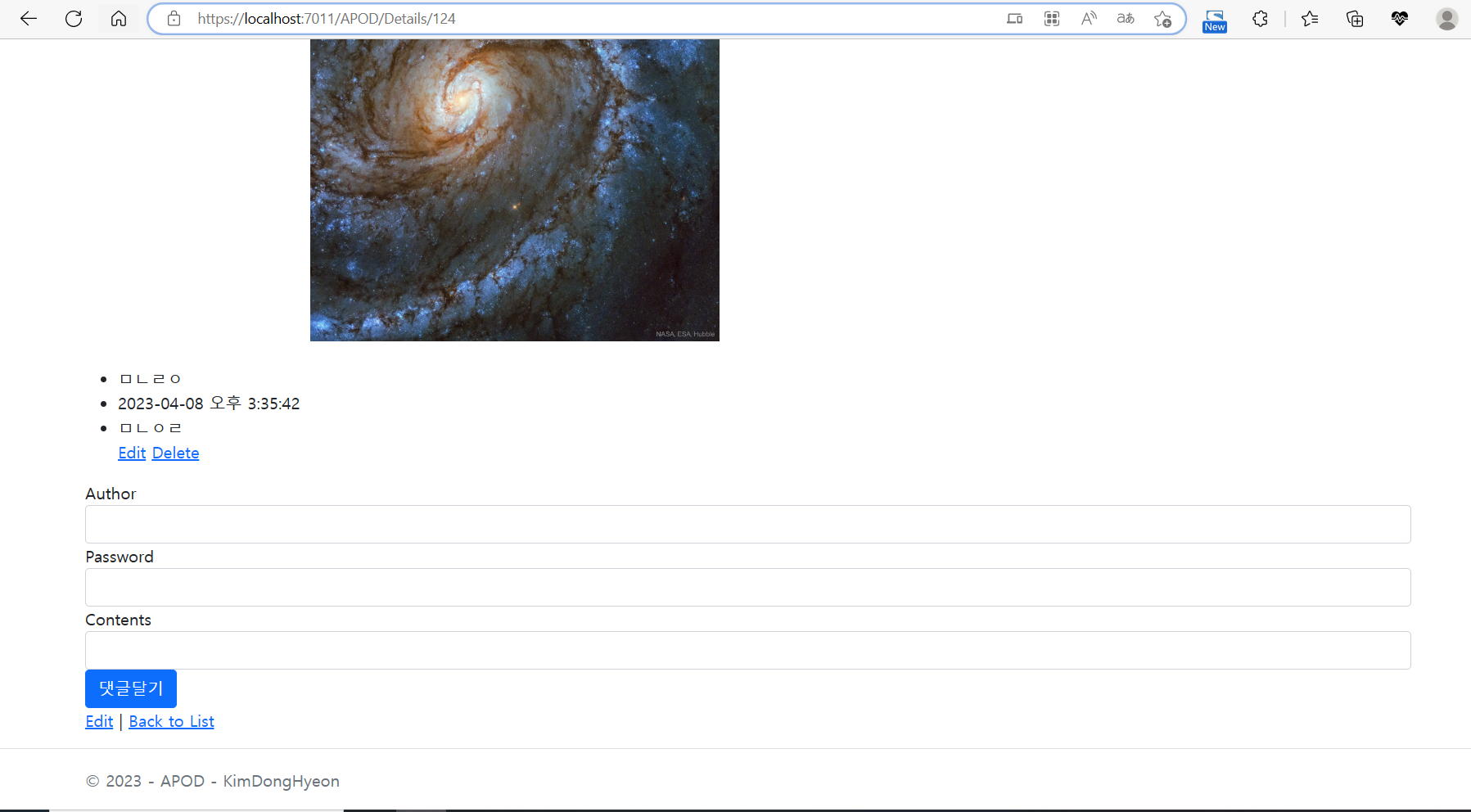
댓글이 정상적으로 등록이 된다!
'기타' 카테고리의 다른 글
| [ASP.NET Core/APOD] View와 RedirectToAction 메서드에 대한 고찰 (0) | 2023.04.11 |
|---|---|
| [ASP.NET Core/APOD] 댓글 저장 방식에 대한 고찰 (0) | 2023.04.10 |
| [ASP.NET Core/Devroup] 다른 엔터티(테이블)와 연관된 모델 속성에 데이터를 추가하고 저장하는 법 (0) | 2023.04.04 |
| [ASP.NET Core/Devroup] ForeignKey: 외래키에 대해 (0) | 2023.03.31 |
| [ASP.NET Core/Devroup] TempData, ViewData에 대한 고찰 (0) | 2023.03.28 |
